
Destiny has always been a console and PC experience — a series defined by smooth gunplay, expansive worlds, and the ability to shape your Guardian’s journey. So when I first heard a full Destiny title was coming to mobile, I was both skeptical and excited. Could this really work outside the living room or desktop?
That game is Destiny: Rising, developed by NetEase, and I’ve spent my first 30 minutes diving in on an M4 iPad Pro with an Xbox controller. Here are my first impressions.
Game Size, Storage, and Devices 💾
Destiny: Rising initially downloads at 3.9 GB, but like Diablo Immortal (also developed by NetEase), more content streams in as you progress. After half an hour of play, the game is already taking up nearly 10 GB on my iPad. Expect this game to grow large — for comparison, Diablo Immortal sits at 25 GB on my device.
The App Store lists iOS 11 or later as a requirement, which technically includes older devices like the iPhone 5S. In reality, you’ll want something much newer to enjoy the game properly.
And yes, controllers are supported — even though Apple’s listing doesn’t highlight this. My Xbox controller paired and worked flawlessly.
Getting Started 🚀
After logging in, Destiny: Rising opens with a cinematic and then asks you to select a body type and voice for your Guardian. The customization options are limited at first, but more become available later — though, not many more.
From there, your Ghost revives you, introduces the world, and hands you control. You can choose between touchscreen and controller inputs. Naturally, I jumped into settings first — tweaking the field of view, sensitivity, and graphics. I ran the game at Ultra settings with a 90 fps cap, and the M4 iPad Pro handled it without issue.

Gameplay and World Design 🌍
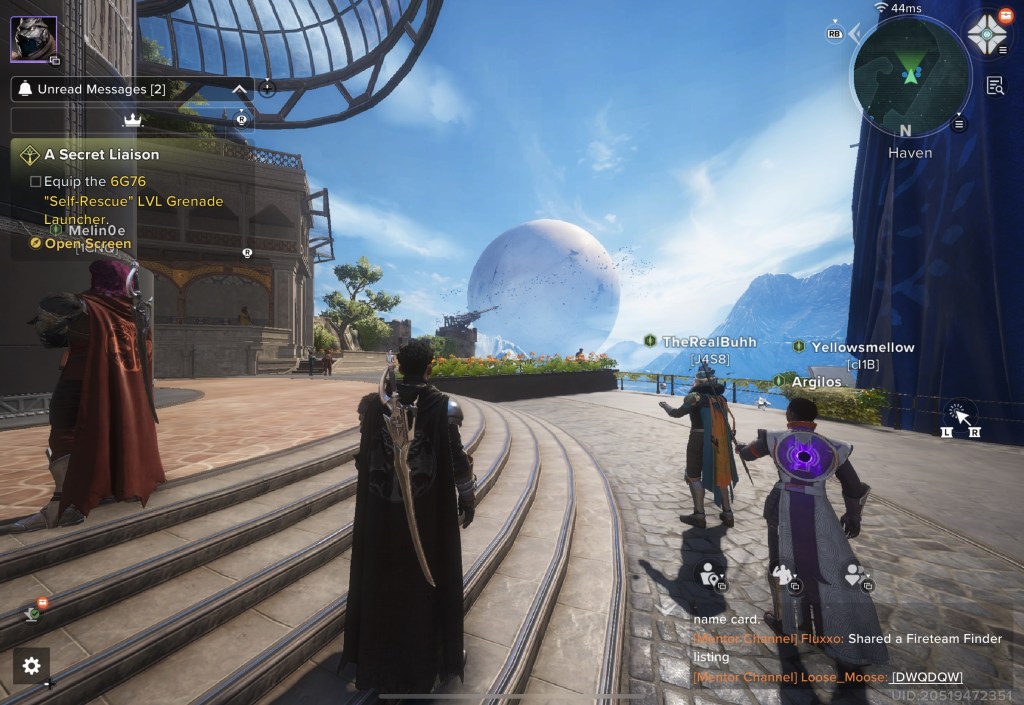
The biggest surprise? How good the game looks. On an 11-inch screen, Destiny: Rising could easily be mistaken for a console or PC version. The environments are detailed, the lighting is rich, and the overall design feels unmistakably Destiny.
Combat and movement also capture that familiar Destiny feel — though not quite as polished. Anyone who’s sunk hours into Destiny or Destiny 2 will notice the difference in responsiveness, but given that this is running on mobile hardware, it’s shockingly close.
One quirk: the auto-aim is quite heavy by default. It makes sense for touchscreen play, but with a controller it felt overbearing. Adjusting this is on my list for next time.
Exploring the hub city was a highlight. I even found a kickable ball (a fun callback to the first Destiny) and hidden jump puzzles with small rewards. The attention to detail shows Bungie’s DNA throughout.
As for missions, I’ve only completed the intro and one follow-up. I expect we’ll see a mix of main story quests, side missions, strikes, and free roam — but I’ll need more time to confirm the full structure.

Microtransactions 💸
I didn’t encounter any monetization prompts in my first session. The game is free-to-play, with microtransactions for cosmetics and potentially gear. Some players online are already criticizing it as pay-to-win because of NetEase’s involvement.
For me, the fact that a game of this scope is free on mobile is impressive enough. I’ll likely buy some cosmetic items just to support continued development.
Final Thoughts ✨
After my first 30 minutes, I can confidently say Destiny: Rising feels like real Destiny on mobile — not a cheap spin-off, but a full experience tailored to smaller screens. The gunplay, environments, and structure are faithful to the franchise.
I plan to try connecting my iPad Pro to a larger monitor to see how it plays on a bigger screen. Unfortunately, the game isn’t available on the Mac App Store, which would have been a natural way to reach even more players. Hopefully that changes down the line.
For now, Destiny: Rising has exceeded my expectations. If you’re a Destiny fan, or just curious to see how far mobile gaming has come, this is absolutely worth downloading.

 Scholars Rest